Gaming Desk Setup: Zo bouw je de perfecte gaming werkplek (Gids 2026)
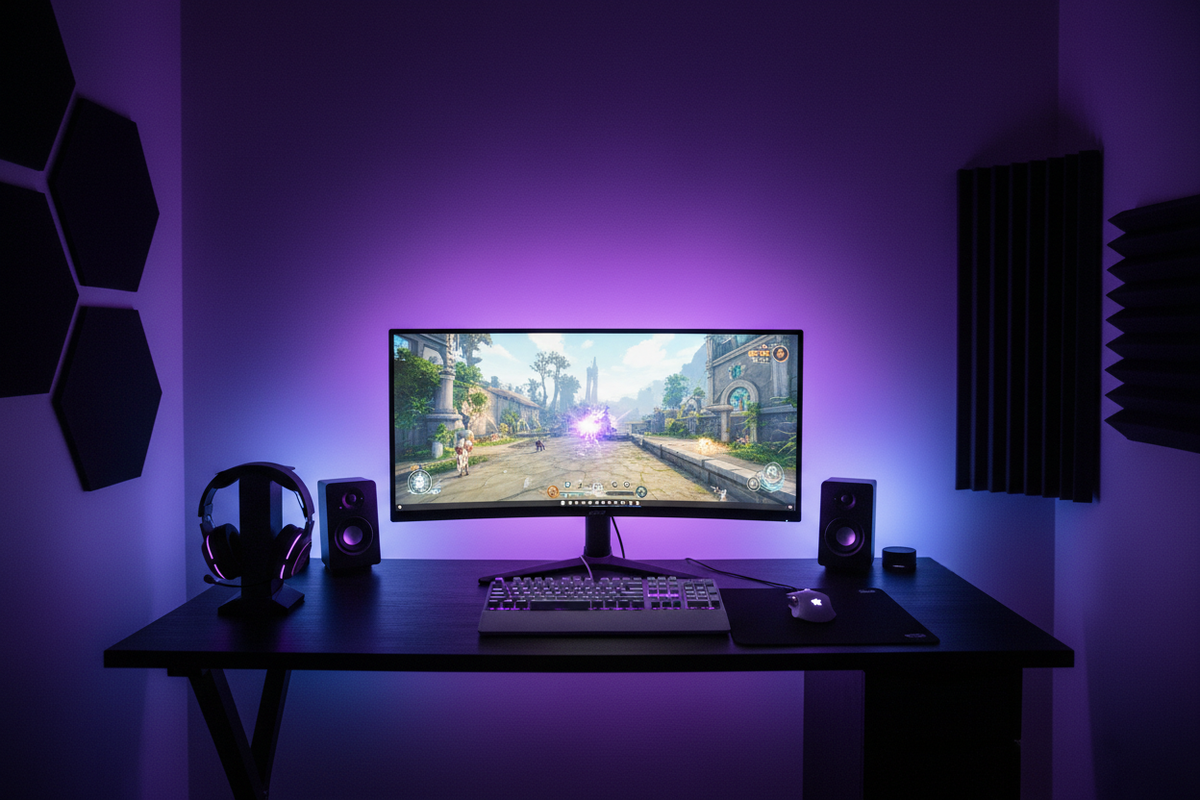
Creëer uw perfecte gamingwerkplek
Een goed ontworpen gaming desk setup kan zowel de prestaties als het comfort aanzienlijk verbeteren tijdens lange gamingsessies. Moderne gamingwerkplekken combineren krachtige hardware, ergonomisch meubilair en meeslepende verlichting om de ultieme gamingomgeving te creëren.
Of u nu een casual gamer bent of een competitieve speler, de juiste setup helpt de focus te verbeteren, vermoeidheid te verminderen en de algehele gamingervaring te verbeteren.
In deze gids leggen we uit hoe u de perfecte gaming desk setup bouwt en welke componenten essentieel zijn voor een modern gamingstation.

De juiste gaming desk kiezen
Een gaming desk moet voldoende ruimte bieden voor uw monitor, toetsenbord, muis en andere accessoires. De basis van elke geweldige gamingwerkplek begint met het kiezen van de juiste desk die voldoet aan uw specifieke behoeften.

Belangrijkste kenmerken om te overwegen
Stevige constructie: Zoek naar desks gemaakt van hoogwaardige materialen zoals massief hout, stalen frames of versterkt MDF.
Kabelbeheersysteem: Ingebouwde kabelbeheeroplossingen houden uw werkplek georganiseerd en voorkomen verwarde draden.
Voldoende oppervlakte: Standaard gaming desks variëren van 120 cm tot 180 cm breed.
Ergonomische hoogte: Veel moderne gaming desks bieden verstelbare hoogtes of zit-sta functionaliteit.
Monitor setup voor gaming

Essentiële monitorspecificaties
144Hz of hogere verversingssnelheid: Monitoren met een hoge verversingssnelheid zorgen voor vloeiendere beweging en verminderde invoervertraging.
Lage reactietijd: Zoek naar monitoren met 1ms reactietijd om bewegingsonscherpte en ghosting te elimineren.
Hoge resolutie: Kies tussen 1080p, 1440p of 4K, afhankelijk van uw GPU en voorkeuren.
Adaptive Sync Technologie: AMD FreeSync en NVIDIA G-SYNC elimineren screen tearing en stotteren.
→ Bekijk onze collectie gamingmonitoren
Gamingrandapparatuur voor uw desk
Gamingtoetsenbord
Mechanische toetsenborden bieden tactiele feedback, snellere actuatie en een duurzaamheid van 50-100 miljoen toetsaanslagen.
Gamingmuis
Een precieze gamingmuis met instelbare DPI, programmeerbare knoppen en een ergonomisch ontwerp is essentieel voor nauwkeurig richten.
Gamingheadset
Kwaliteitsaudio is cruciaal voor competitief gamen. Zoek naar headsets met 7.1 surround sound en noise-cancelling microfoons.
Muispad
Verlengde muispads bieden een consistent trackingoppervlak voor zowel uw muis als toetsenbord.
Verlichting en esthetiek

Soorten gamingverlichting
LED-lichtstrips: Zelfklevende RGB-strips gemonteerd achter monitoren of onder desks creëren sfeervolle achtergrondverlichting.
Biasverlichting: Verlichting achter uw monitor vermindert oogvermoeidheid tijdens lange gamingsessies.
Slimme lampen: Programmeerbare slimme lampen stellen u in staat om aangepaste lichtscènes te creëren.
Perifere RGB: Moderne gamingrandapparatuur beschikt over aanpasbare RGB-verlichting die gesynchroniseerd is via software.
Kabelbeheeroplossingen

- Kabelgoten: Zelfklevende kanalen die kabels langs de randen van de desk verbergen
- Kabelhulzen: Flexibele stoffen buizen die meerdere kabels bundelen
- Klittenband: Herbruikbare banden voor het organiseren van kabelbundels
- Opbergladen onder de desk: Gemonteerde trays die stroomstrips en overtollige kabels vasthouden
Ergonomie en comfort
Gamingstoel
Investeer in een kwaliteitsvolle gamingstoel met lendensteun, verstelbare armleuningen en ademende materialen.
Bureauhoogte en monitorpositie
Uw monitor moet op ooghoogte zijn, ongeveer op armlengte afstand. Overweeg een in hoogte verstelbaar bureau om af te wisselen tussen zitten en staan.
Budgetplanning voor uw gaming desk setup
Budget setup (€500-800)
- Basis gaming desk: €150-250
- 1080p 144Hz monitor: €200-300
- Instaprandapparatuur: €150-250
Middenklasse setup (€1200-2000)
- Kwaliteitsvolle gaming desk: €300-500
- 1440p 165Hz monitor: €400-600
- Premium randapparatuur: €300-500
Premium setup (€3000+)
- High-end verstelbare desk: €600-1000
- Dubbele 1440p of 4K monitoren: €1000-2000
- Topklasse randapparatuur: €600-800
Veelgestelde vragen
Welk formaat bureau heb ik nodig om te gamen?
Voor een opstelling met één monitor is 120 cm x 60 cm voldoende. Voor twee monitoren kunt u bureaus van 150-180 cm breed overwegen.
Hoe belangrijk is kabelbeheer?
Kabelbeheer verbetert het uiterlijk, de luchtstroom en maakt schoonmaken gemakkelijker.
Heb ik RGB-verlichting nodig om te gamen?
RGB is puur esthetisch. Geef voorrang aan prestatiecomponenten als het budget beperkt is.
Voltooi uw gaming desk setup
Het bouwen van de perfecte gaming desk setup is een reis die functionaliteit, comfort en persoonlijke stijl combineert. Begin met de essentie en breid uit naarmate uw budget het toelaat.
→ Gamingaccessoires | → Gamingmonitoren | → Gamingtoetsenborden | → Gamingmuizen | → Gamingheadsets
Alle producten worden geleverd met gratis verzending binnen Europa en fabrieksgaranties.
🔗 Gerelateerde gaminggidsen
🔥 Bouw uw perfecte gamingwerkplek met snelle EU-verzending.